Use this guide when you want to build a simple hunt from scratch and get it ready for players.
Before You Start
- Sign in to Backyard Hunt.
- Decide whether you want a Treasure Hunt or Scavenger Hunt.
- Prepare a short hunt name and a rough idea of where players will search.
Steps
- Open Backyard Hunt and go to My Hunts.
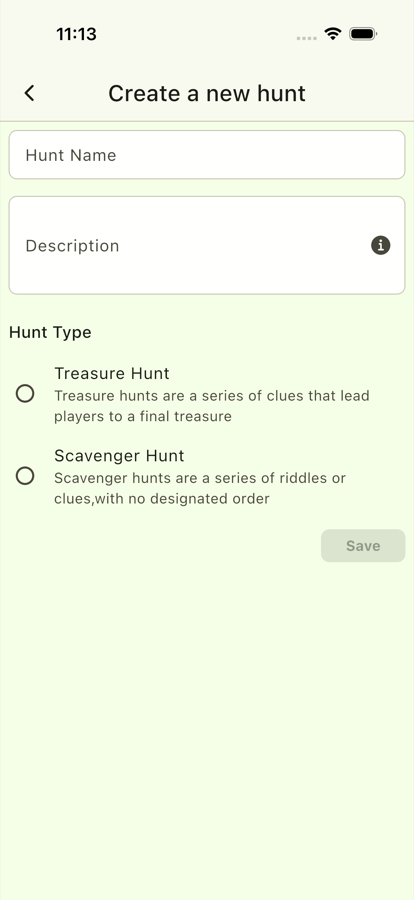
- Tap Create New Hunt.
- Enter a clear hunt name.
- Choose the hunt type:
- Use Treasure Hunt when players should follow clues in order.
- Use Scavenger Hunt when players can find clues in any order.
- Fill in the basic hunt details.
- Save the hunt.
- Open the new hunt from My Hunts.
- Add at least one clue task before sharing or playing.
Check Your Hunt
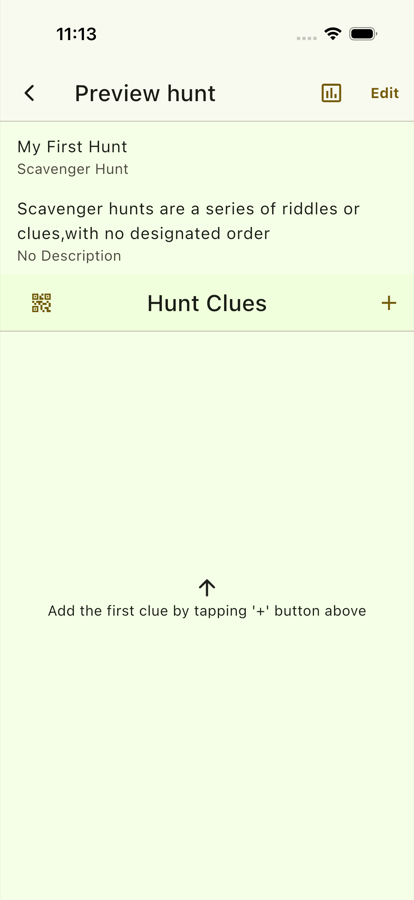
Before players start, open the hunt details page and confirm:
- The hunt name is correct.
- The hunt type matches the way you want to play.
- The clue list has the right number of tasks.
- The QR code setup matches the hunt type.
Next Steps
- Add more clues with Add Clues and Tasks.
- Prepare codes with Prepare QR Codes.
- Share the hunt with Share a Private Hunt.